Single device
One person entering and viewing
$995 or $331.67 a month for 3 months
Data stays on one computer or phone, with a backup file to move it. Alerts show on screen.
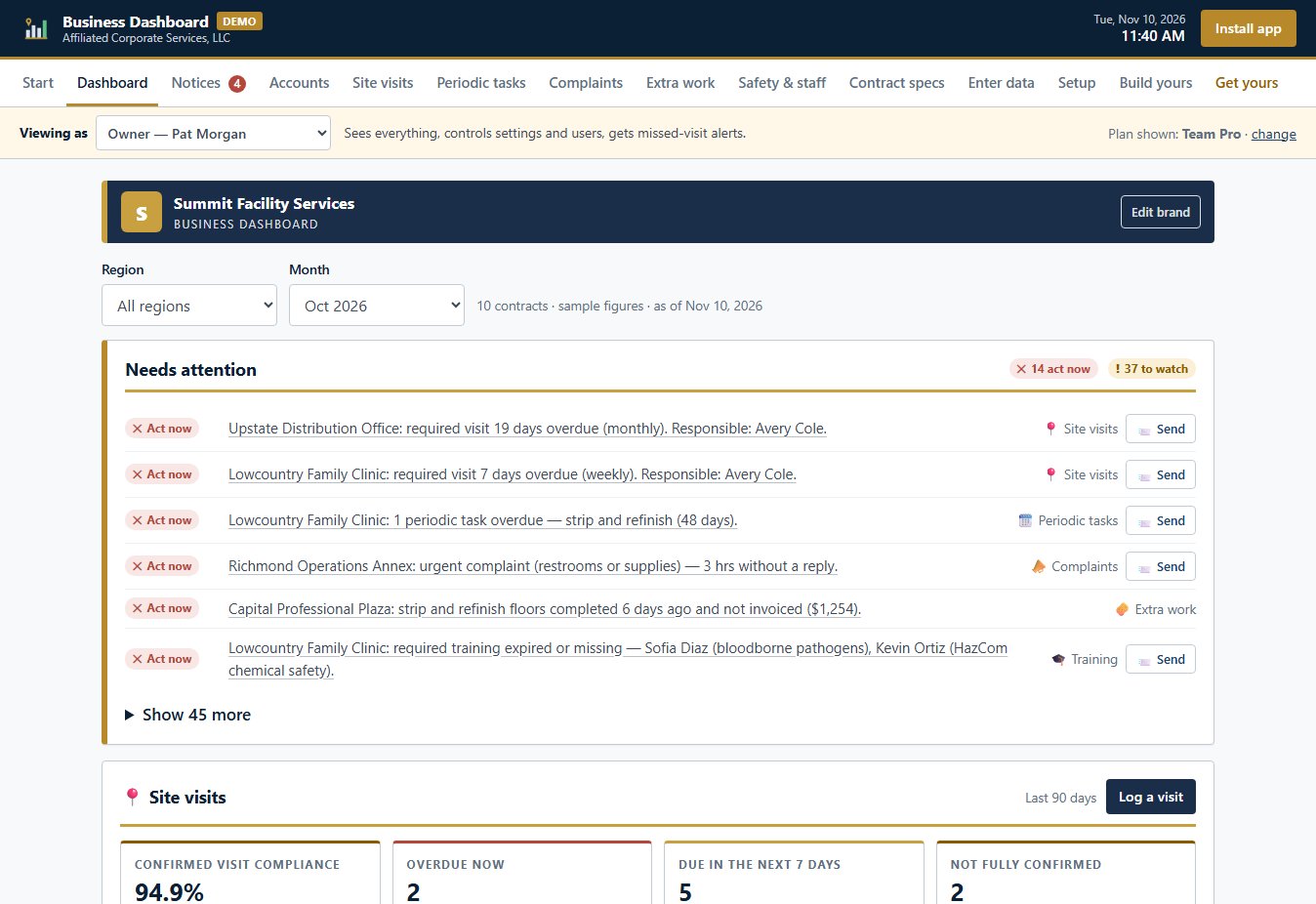
See where your business stands every morning. Finances, contracts, labor, staffing, quality and site visits on one screen, account by account, with everything that is off target listed first.
A narrated walk through the Dashboard, estimating, account viability, checklists and quizzes, the Contractor Calculator, scheduling, time clock, billing and the Field Companion, using sample data for a fictional company. Captions are on, and a transcript is below the video.
Also on YouTube: Watch the tour on YouTube
The accounting system, payroll, a spreadsheet of contracts, supervisors’ texts, inspection forms, and memory. The Business Dashboard brings them onto one screen, flags what is off target, and lets you open any account to see why. You choose the modules and set the targets that turn each measure green, amber or red. It carries your company’s name and colors and installs on phones and computers.
What is it costing you? Enter five numbers from your own business: unbilled extra work, hours over budget, underpriced accounts, accounts lost by surprise and time spent piecing information together. See where money leaks between the work and the bank, and whether the Dashboard would pay for itself. Count the cost
Every screenshot below is the live demo, running on sample data for a fictional company. Open the demo to try it yourself.
The time, money, peace of mind and good name each feature gives back, feature by feature.
Free guides for contractors: Track profit by account · Labor budget vs. actual hours · Production rates explained · Software without a subscription
Every measure that is off target appears in a single list, ranked Act now or Watch, and each item links to its account. In the demo that means overdue visits, a complaint with no reply, floor work done and never invoiced, and a lapsed training certificate.
Tap Send beside an item and a notice goes to the right person, in English or Spanish.
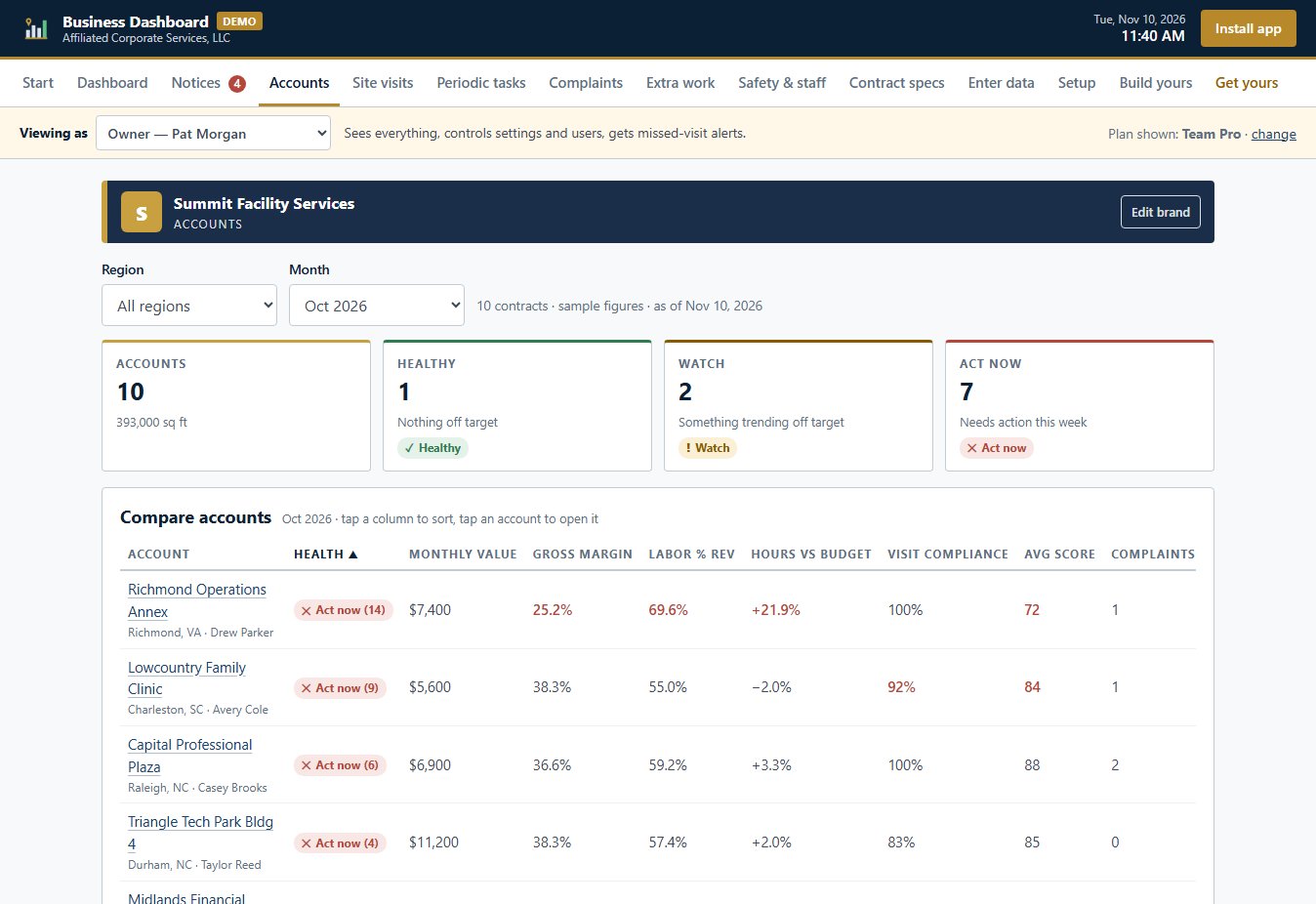
Accounts are ranked by health, with gross margin, labor as a percent of revenue, hours against budget, visit compliance, inspection score and complaints side by side.
Open an account for profit by month, receivables aging, labor, visits, quality, supplies and equipment. Print a one-page account review, including a client version with no financials.
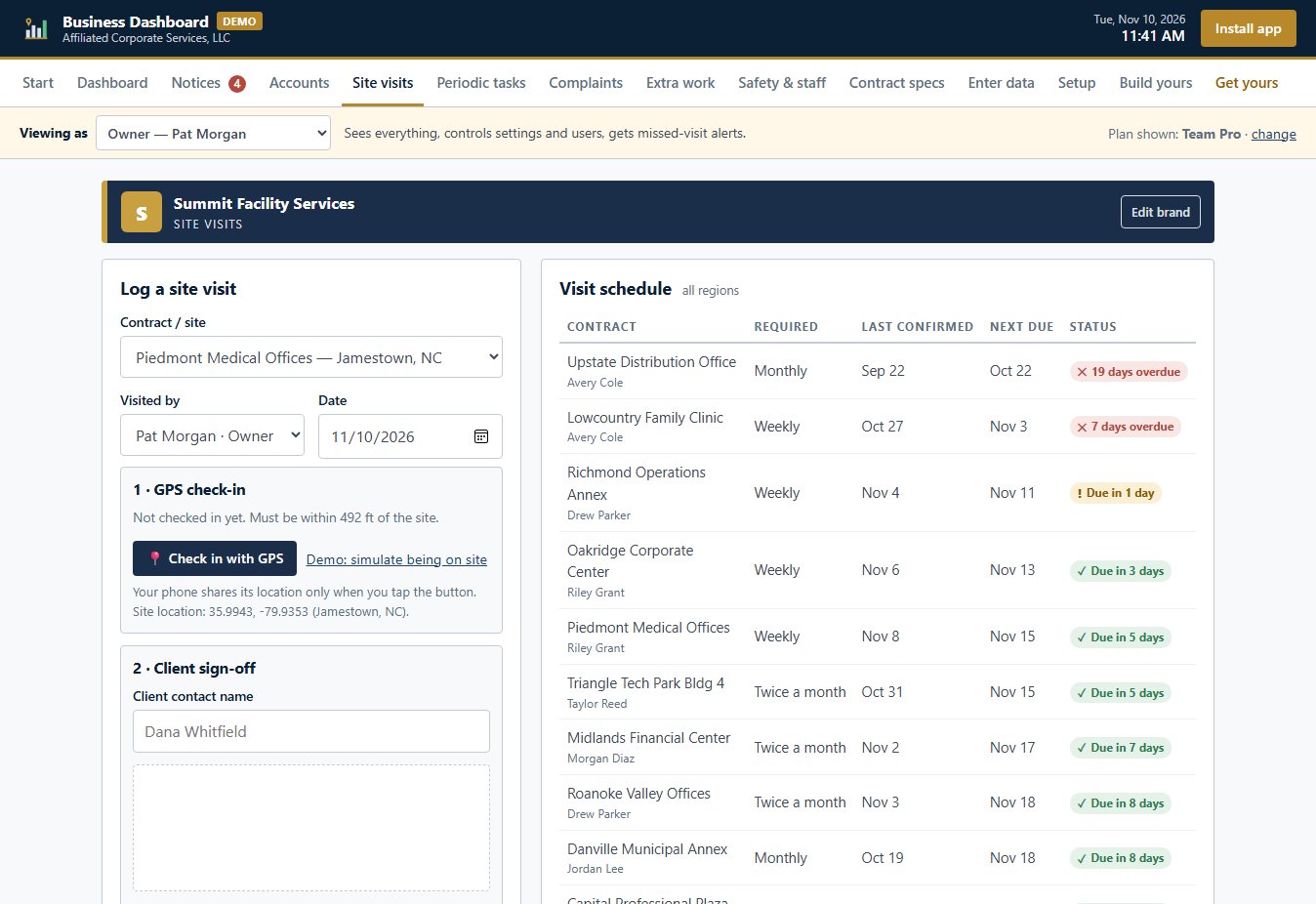
The supervisor checks in by GPS at the site (within about 500 feet) and the client signs on the phone. Missing either, the visit is logged but not counted.
A visit more than two days past due emails the owner and a senior manager. Visit compliance is tracked over the last 90 days.
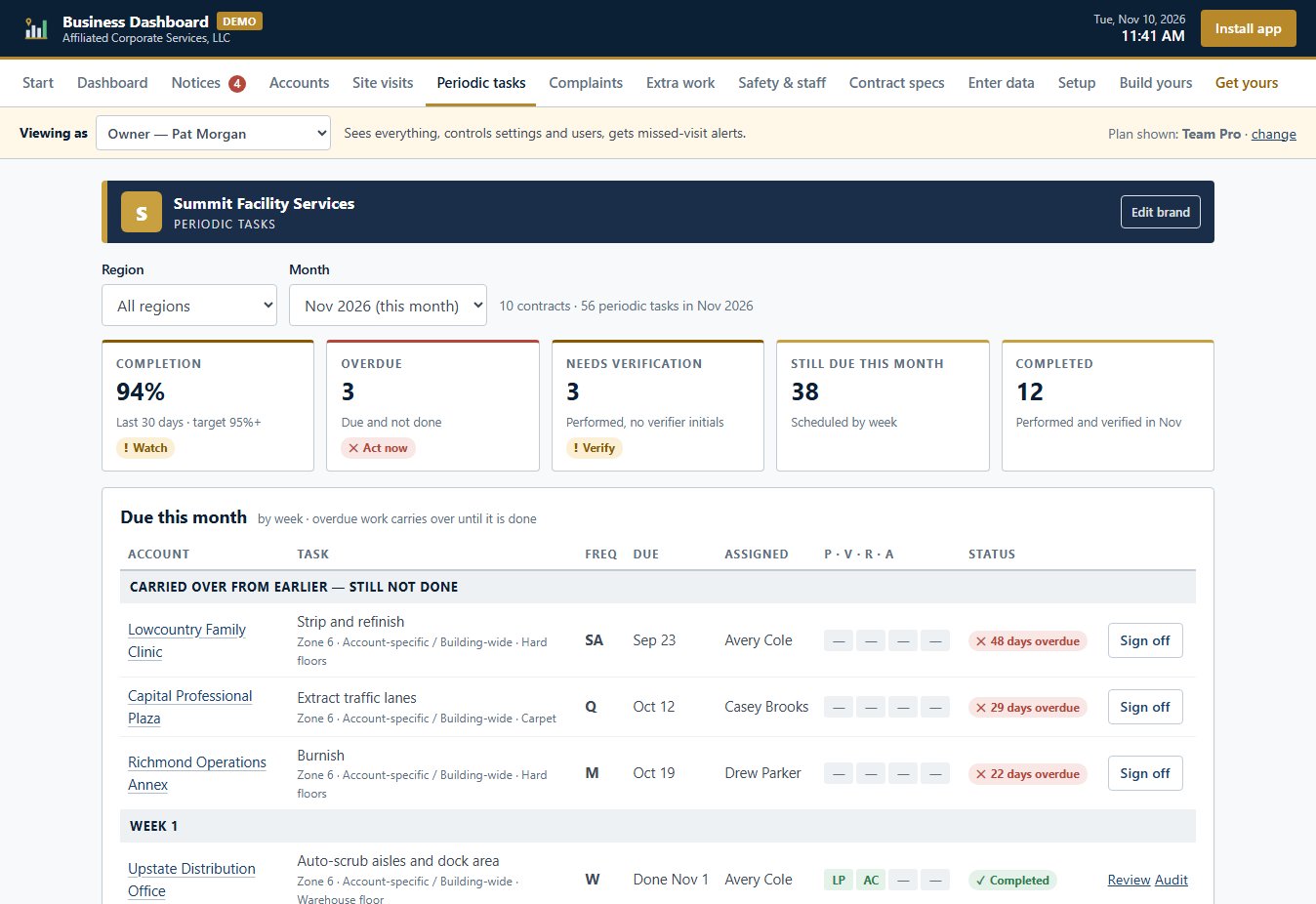
Floor care, carpet extraction, windows and other periodic work are listed for every contract: what is due this month and what is overdue. Each task is signed off as performed, verified, reviewed and audited. No initials, not completed.
Printable English and Spanish sheets are included.
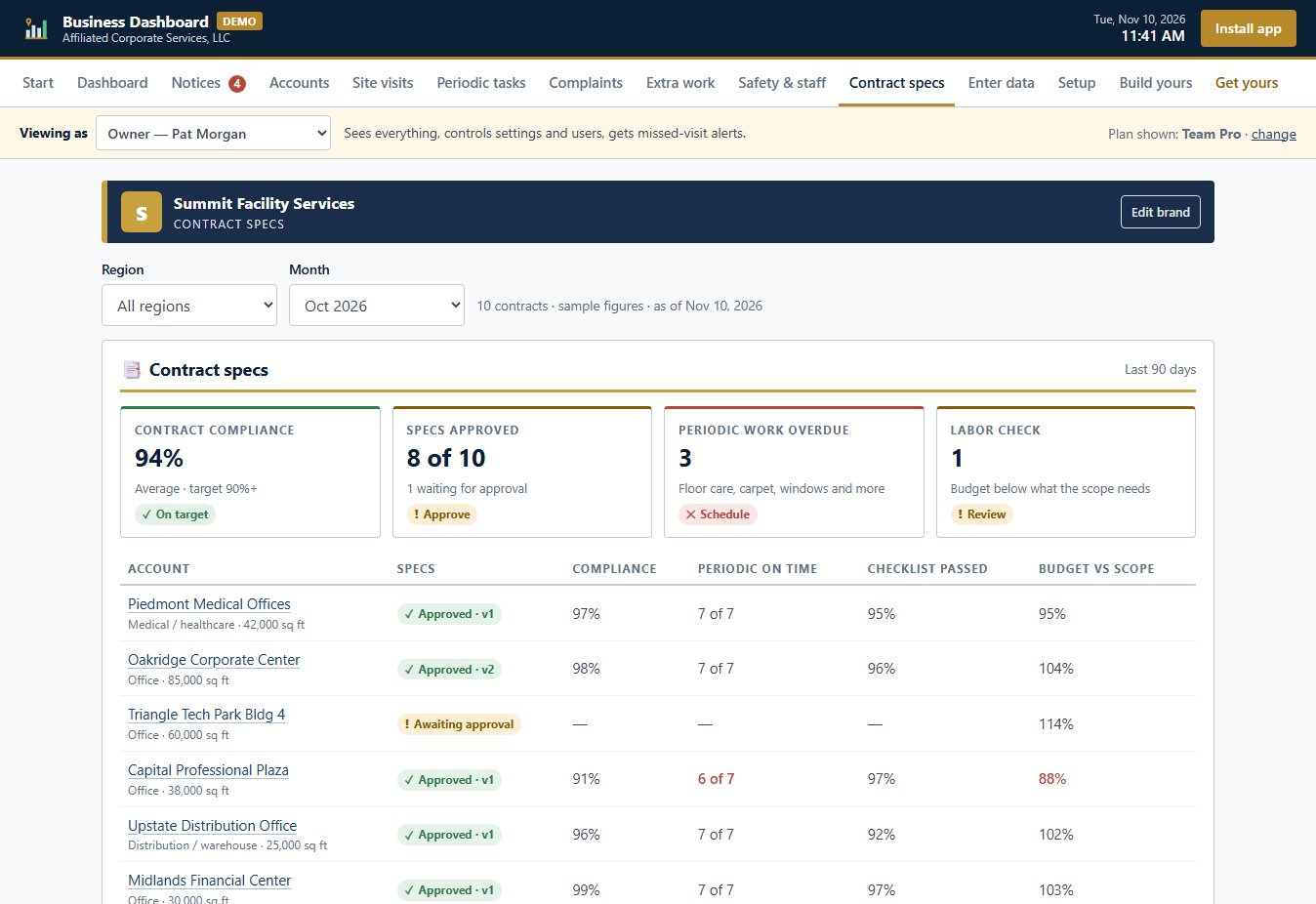
Upload a contract and AI lists every area, task and frequency, plus the extra-work rates, for a manager to review and approve. Nothing is used until it is approved.
The approved specifications drive the task register, the visit checklists, a compliance score and a labor check against budget.
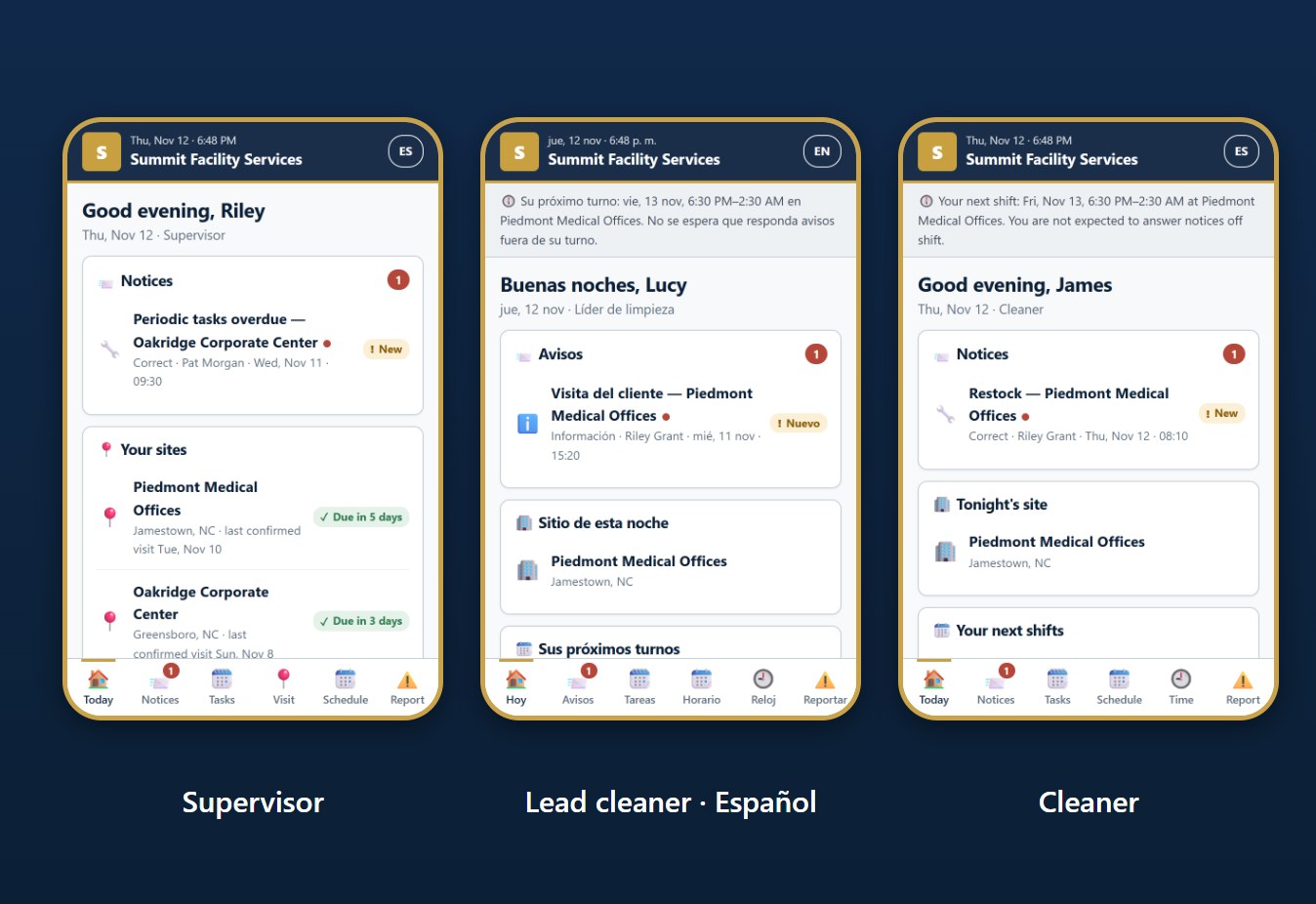
The Field Companion connects your people on site to the Dashboard. Supervisors confirm visits with GPS check-in and client sign-off. Lead cleaners and cleaners receive notices, sign off periodic tasks, correct complaints and report problems from the site.
Cleaners see only their own tasks and never the Dashboard. Every screen works in English or Spanish. Available on the Team and Team Pro plans.
You choose the modules your business needs and set the targets that matter. Periodic tasks, Complaints and Extra work are included on every plan.
Getting your numbers in: monthly forms, QuickBooks, payroll or Excel imports, or your own Google Sheet on the Team plan.
Pay in full, or spread the same price over 3, 6 or 12 months. No interest, no fees and no subscription: when the payments end, it is yours. A written quote confirms scope and price before any work begins.
Not sure which plan pays for itself, or whether any does? Count what it is costing you first . It uses your own numbers and says so when the Dashboard would not pay back.
One person entering and viewing
$995 or $331.67 a month for 3 months
Data stays on one computer or phone, with a backup file to move it. Alerts show on screen.
Staff enter, managers view from anywhere
$2,495 or $415.83 a month for 6 months
Data saves to a Google Sheet in your own Google account, with Google sign-in and daily missed-visit emails from your own Gmail. Up to 20 sites and 15 users.
Multi-site and multi-state, with roles
From $4,500 by the modules you choose; or pay monthly over 12 months
Data saves to a database account in your name. Each person gets a login and a role, and supervisors see only their sites. Contract specs (with checklists and quizzes), Notices, Estimating and Account viability are included. You pay the providers directly: free tier or about $25 per month.
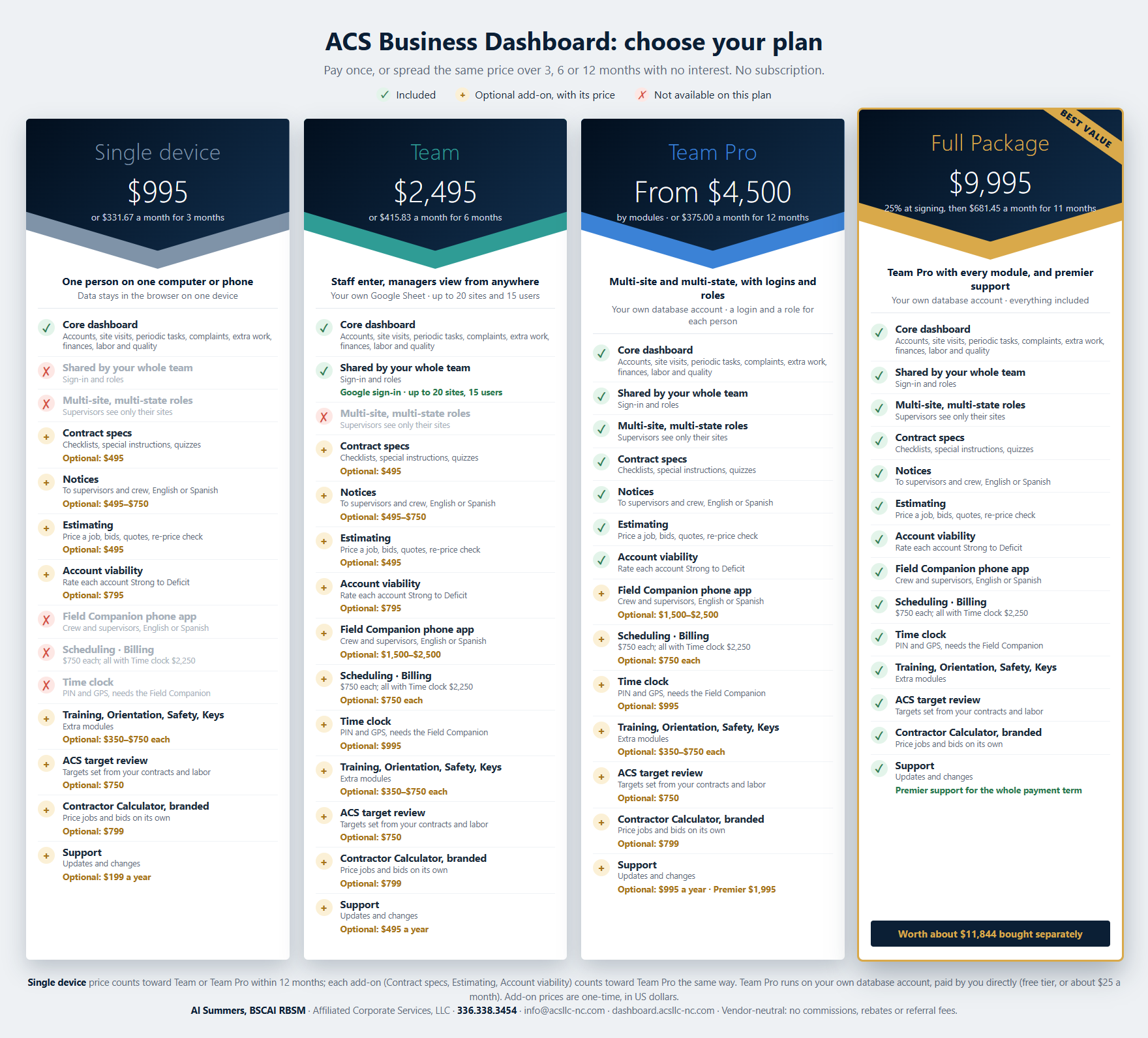
Team Pro with every module, the branded Contractor Calculator, the ACS target review and premier support for the payment term. One price, or 25% at signing and 11 monthly payments of about $681, with no interest.
Your Single device price, and any Contract specs, Estimating or Account viability add-on, counts toward Team or Team Pro within 12 months; if you are still paying monthly, the credit is the amount paid so far. Prices are in US dollars.
There is no subscription. Once the price is paid, nothing more is owed to ACS. Support is optional, ordered separately in writing, and comes in two levels.
| Feature | Standard support | Premier support |
|---|---|---|
| Price | $199 a year on Single device $495 a year on Team $995 a year on Team Pro | $1,995 a year Team Pro only |
| Who it suits | You are comfortable running the Dashboard and want updates and changes handled. | Multi-site or multi-state operators who want quick answers and a regular review. |
| Updates and changes | Updates and small changes after hand-over | Same, with priority over standard requests |
| Response time | Within 24 hours | Same business day (within 4 business hours) |
| How you reach us | 336.338.3454 or info@acsllc-nc.com | Phone, email and screen-share |
| Training | — | Two 1-hour sessions a year |
| Contract reading | — | Up to 6 new or amended contracts a year |
| Production rates and targets | — | Yearly review by an RBSM |
| Health check | — | Quarterly, 45 minutes |
| Consulting on bids and pricing | — | 4 hours a year |
| Custom changes | Quoted separately | Quoted separately |
| Your plan | Standard | Premier |
|---|---|---|
| Single device | $199 a year | Not offered |
| Team | $495 a year | Not offered |
| Team Pro | $995 a year | $1,995 a year |
| Full Package ($9,995) | Not needed | Included for the payment term, then $1,995 a year if you continue |
Neither level covers third-party outages (Google, your database provider) or your own devices. Support uses temporary access that you grant and remove, so ACS keeps no login. Download the one-page support comparison (PDF)
The demo lets you design the Dashboard yourself, with no figures to enter and nothing to install.
Yes, on every plan, at the same price as paying in full. There is no interest, no fee and no subscription. The terms are 3 months for Single device, 6 months for Team and 12 months for Team Pro, and add-ons are spread over the same term. When the last payment is made, the Dashboard is yours. Your written quote shows the exact monthly amount.
Support is optional and ordered separately. Standard support ($199, $495 or $995 a year by plan) covers updates and changes with a response within 24 hours. Premier support ($1,995 a year, Team Pro only, included in the Full Package for the payment term) adds a same-business-day response, training, contract reading, a yearly rate and target review, a quarterly health check and consulting hours. See the side-by-side comparison.
No. Numbers come in through monthly forms, QuickBooks, payroll or Excel imports, or your own Google Sheet on the Team plan.
Yes. The Dashboard is branded as your own, with your name and colors, and installs on phones and computers.
No. The demo runs on sample figures for a fictional company, Summit Facility Services. Anything you change in the demo stays in your own browser.
No. You send ACS design choices, such as which modules and targets you want, not your figures. Your data stays on your device or in accounts in your own name, and ACS keeps no login.
ACS can add a module built for your business, or adapt the Dashboard’s terminology, reports and priorities. The scope is agreed in writing before development begins. See all ACS software or talk to us.
ACS is led by Al Summers, a BSCAI Registered Building Service Manager. ACS is independent and vendor-neutral, with no commissions, rebates or referral fees. Open the demo, switch between the roles, and then book a demo or request a walkthrough with your own accounts and targets in mind.